

Native Video Player Android Guide: Build with Media3
A video that plays in a sample screen can still fail when a viewer switches networks, backgrounds the app, selects captions, or opens Widevine-protected content. Building a native video player Android experience therefore means owning the whole playback session—not merely putting a URL into a view.
This guide shows Android engineers and OTT product teams how to choose the right playback API, implement Media3 ExoPlayer in Kotlin, and design for adaptive streaming, DRM, observability, and device fragmentation. The goal is a player architecture you can take into production, not another five-line demo.
What is the best native video player for Android?
For most new Android video apps, the best native playback foundation is ExoPlayer in Jetpack Media3. It is Google's recommended Player implementation and supports progressive files, adaptive streaming, playlists, ads, and DRM while remaining updateable as an app dependency.
“Native” here describes an Android-specific client built with Kotlin or Java and Android's media stack. It does not mean you must use the framework MediaPlayer class. Google's current basic Media3 playback guide recommends ExoPlayer for most playback use cases and notes that it helps abstract differences across Android devices and OS versions.
Media3 is the home of ExoPlayer, PlayerView, Compose playback UI, MediaSession, background services, and related components. As of August 2026, the Media3 release page lists 1.10.1 as the stable release. Check that page before adopting a version, keep all Media3 modules aligned, and qualify upgrades against your stream and device test matrix.
Native video player Android options: what should you choose?
The choice is less about which API can display an MP4 and more about how much streaming behavior your product needs to own.
| Option | Best fit | Advantages | Limits and ownership |
|---|---|---|---|
| Jetpack Media3 ExoPlayer | OTT, live, education, sports, social video, or any evolving playback product | HLS/DASH, playlists, Widevine, ads, track selection, analytics, extensible networking and buffering | Your team still owns lifecycle, UX, entitlement, telemetry, testing, and delivery quality |
Framework MediaPlayer | A narrow, basic playback feature tied to common formats | Small API surface; built into Android | Fewer app-level controls and features; updates depend on the OS image |
| Commercial player SDK | Teams that want packaged analytics, multi-DRM, support, or vendor-specific features | Faster access to bundled capabilities and support | Licensing, integration boundaries, vendor roadmap, and switching cost |
| Cross-platform wrapper | Shared product code is more important than native customization | One interface across platforms | Native failures still surface underneath; advanced Media3 capabilities may lag or require platform bridges |
Android's own MediaPlayer documentation cautions that Jetpack Media3 is the recommended way to add media to an app. Use framework MediaPlayer only when the requirement is genuinely simple and its OS-coupled behavior is acceptable.
Choose a commercial SDK when the contract—not just the code—removes meaningful work: certified DRM paths, vendor analytics, support SLAs, specialized codecs, or a proven advertising integration. A wrapper is reasonable when video is a small part of a cross-platform app. For a playback-led product, direct Media3 access usually gives Android engineers the clearest route to debugging, device-specific workarounds, and new platform capabilities.
If an existing app imports com.google.android.exoplayer2, do not treat that as the current path. Google's Media3 migration guide says the standalone ExoPlayer project is discontinued and directs apps to androidx.media3.
Native video player Android implementation with Media3
A maintainable implementation separates the playback engine, visual surface, and session owner. The UI observes a Player; a screen or service owns the ExoPlayer instance; and domain code supplies authorized MediaItem objects rather than letting views assemble signed URLs or DRM policy.
1. Add only the Media3 modules you need
Use one version variable for every module. A VOD app playing HLS and DASH with a view-based UI could begin with:
val media3Version = "1.10.1"

dependencies {
    implementation("androidx.media3:media3-exoplayer:$media3Version")
    implementation("androidx.media3:media3-exoplayer-hls:$media3Version")
    implementation("androidx.media3:media3-exoplayer-dash:$media3Version")
    implementation("androidx.media3:media3-ui:$media3Version")
}
Add media3-session for a media session or background playback, media3-exoplayer-ima for client-side IMA ads, and the relevant data-source module if you standardize on Cronet or OkHttp. Do not copy every extension into the app “just in case.” Each module adds another dependency and another behavior to qualify.
2. Create one player owner and bind the UI
The minimal foreground implementation is small, but ownership must be explicit:
class PlayerFragment : Fragment(R.layout.fragment_player) {
    private var player: ExoPlayer? = null
    private var resumePositionMs = 0L

    private val playerView: PlayerView
        get() = requireView().findViewById(R.id.player_view)

    override fun onStart() {
        super.onStart()
        val exoPlayer = ExoPlayer.Builder(requireContext()).build().also {
            it.setMediaItem(MediaItem.fromUri(requireArguments().getString("stream_url")!!))
            it.seekTo(resumePositionMs)
            it.prepare()
            it.playWhenReady = true
        }
        player = exoPlayer
        playerView.player = exoPlayer
    }

    override fun onStop() {
        player?.let {
            resumePositionMs = it.currentPosition
            playerView.player = null
            it.release()
        }
        player = null
        super.onStop()
    }
}
This sample deliberately shows one owner and symmetrical acquisition and release. Adapt lifecycle timing to your minimum API and product behavior: Google's guide recommends preparing in onStart() on API 24 and above, or onResume() on API 23 and below, with the corresponding release callback. If playback must survive navigation or backgrounding, the Activity or Fragment is the wrong owner; use a session service.
Keep all access on the player's application thread. The Media3 getting-started guide explains that ExoPlayer must be accessed from a single application thread and that the main thread is required with its UI components. Random coroutine dispatchers around player calls can create wrong-thread exceptions instead of performance gains.
3. Turn playback callbacks into product state
Do not expose raw player constants directly across the app. Map them into a small state model such as preparing, ready, playing, user-paused, buffering, ended, and failed. Record viewer intent separately: STATE_BUFFERING after a play request means something different from buffering while the viewer has paused.
Listen for playback state, isPlaying, errors, tracks, and media transitions. Preserve the content ID, playback position, selected audio and text preferences, and whether playback should resume. When the item changes, make one domain event responsible for updating the UI, media session metadata, and analytics so those surfaces cannot drift apart.
4. Decide whether the player belongs in a service
Use an in-screen player for a focused video experience that should stop when the screen goes away. Use MediaSessionService when playback continues in the background or must integrate with system controls, Bluetooth devices, Android Auto, Wear OS, or other controllers.
Google's background playback guide places the Player and MediaSession inside a separate service, with a MediaController connecting the UI to that session. This architecture avoids creating a second player when an Activity is recreated and gives one authoritative queue and playback state.
Build the native video player Android stack for production
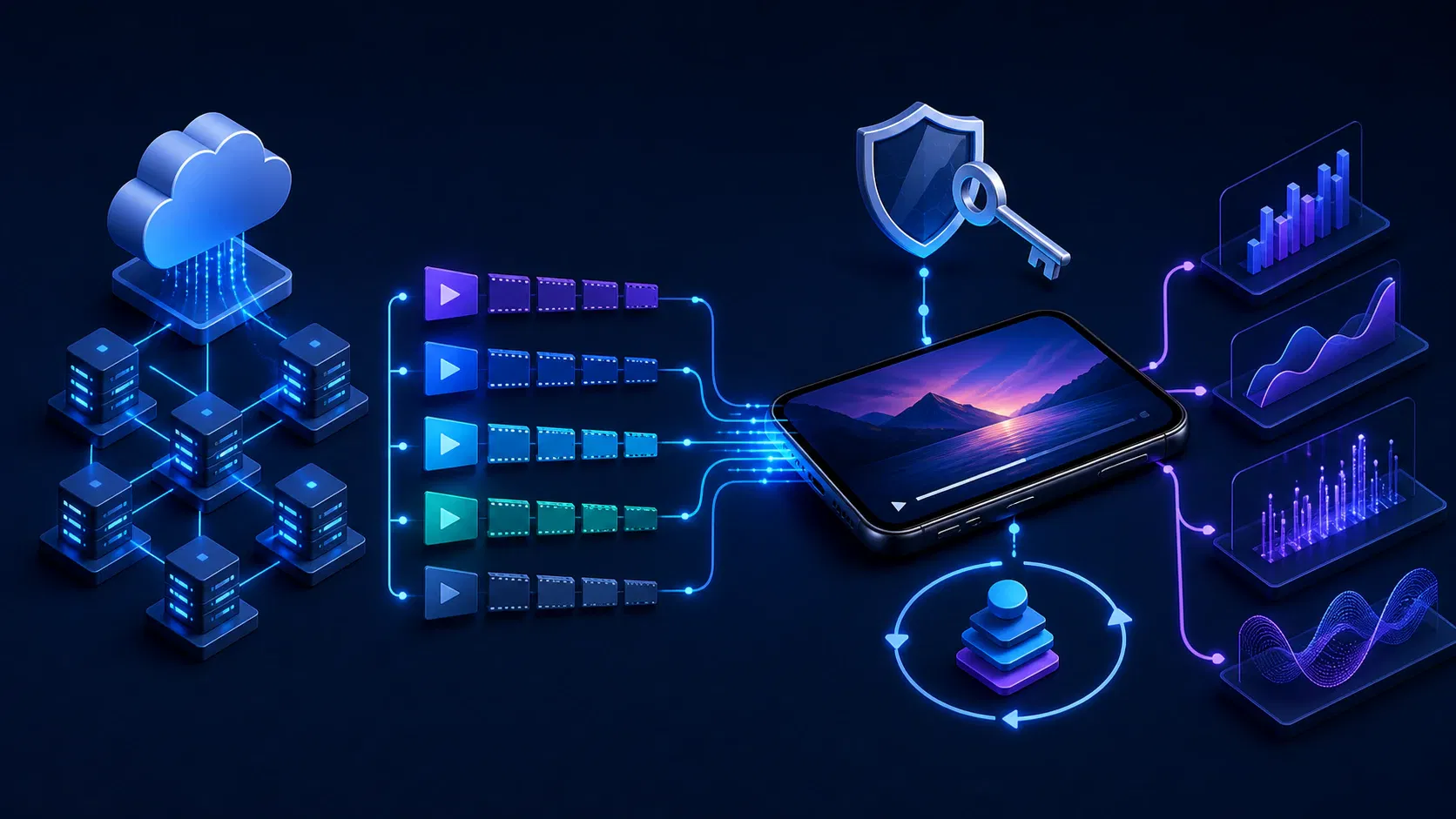
Once one test asset plays, shift attention from the view to the contracts around it. Most serious playback failures occur at the boundary between the app, manifest, CDN, license service, device decoder, and analytics pipeline.
Treat the stream as a device-specific contract
ExoPlayer supports HLS, DASH, progressive containers, subtitles, and other inputs, but a container name alone does not guarantee playback. Google's supported formats reference distinguishes the streaming protocol, container, and audio/video sample formats; by default, ExoPlayer uses Android's platform decoders, so codec support ultimately varies by device. The broader adaptive bitrate streaming design also depends on packaging, ladder, origin, and CDN behavior outside the app.
Build an encoding and packaging matrix for your actual audience. Include codec and profile, resolution, frame rate, HDR mode, audio codec and channel layout, captions, encryption scheme, and minimum OS. Validate multivariant manifests for aligned segments and realistic bandwidth declarations. A broken rendition can make adaptive playback look like a player bug.
Let DefaultTrackSelector start with sensible choices, then apply product rules through TrackSelectionParameters: preferred audio and text languages, caption behavior, maximum video size for constrained screens, or temporary data-saving limits. The official track-selection guide notes that available tracks are known after preparation and can change between items, so build selectors from actual track data rather than hard-coded menu labels.
Choose networking and caching deliberately
The default data source is convenient, but the network stack affects connection reuse, protocol support, authentication, and diagnostics. Media3 directly supports Android's built-in stack, HttpEngine, Cronet, and OkHttp. Google's network stack guide recommends HttpEngine on supported recent devices or Cronet via Google Play services with a fallback for streaming-focused apps, while recognizing cases where OkHttp or the built-in stack is a better product tradeoff.
Use one shared client or engine instance, inject request headers through the data-source layer, and define timeouts and retry policy by failure class. Never log signed stream URLs or authorization headers. A disk cache can prevent repeat downloads during seeks or replays, but it is not the same as a managed offline-download feature; give the cache a bounded eviction policy and make its ownership application-wide.
Add Widevine as an entitlement workflow
For premium content, the player needs more than a license URL. It needs a DRM scheme, secure authorization data, a license policy, and observable failure handling within the wider secure streaming design. ExoPlayer uses Android's MediaDrm API, and Google's DRM guide documents Widevine support for DASH and fragmented-MP4 HLS, with minimum API levels depending on the encryption scheme.
Keep entitlement decisions and long-lived secrets on the server. Issue short-lived playback authorization to the app, attach the DRM configuration to the authorized MediaItem, and distinguish authentication, entitlement, provisioning, license, key-expiry, and decoder failures. Test expired tokens, delayed license responses, clock skew, offline policy, key rotation, and transitions between clear and encrypted periods.
If your release also spans Android TV, Fire TV, iOS, and web, this is where player work becomes OTT app development rather than a single Android module. Apexnova builds custom video players around Media3/ExoPlayer, AVPlayer, adaptive delivery, multi-DRM, captions, ads, and QoE analytics, which is useful when the acceptance criteria cross the app, packaging, CDN, entitlement, and operations teams rather than fitting inside one Android module.
Instrument viewer outcomes, not just crashes
A crash-free Android media player app can still have slow starts, frequent rebuffers, or low-quality playback. Register an AnalyticsListener and connect the events to your broader video analytics software, preserving a stable playback-session ID, content ID, app version, device class, network type, CDN, and DRM status without collecting signed URLs or unnecessary personal data.
Media3's analytics guide shows that PlaybackStatsListener can interpret raw events into playback time, wait states, resolution, dropped-frame rate, and bytes read. Build operational metrics around play request to first rendered frame, rebuffer count and duration, playback failure rate by stage, average selected bitrate or resolution, dropped frames, completion, and viewer-initiated exits.
Enable EventLogger in debug builds or controlled diagnostics. Google's debug logging guide shows how it reports selected tracks, format support, adaptive switches, and decoder initialization—the evidence needed to separate a manifest issue from a device decoder issue.
Design ads, captions, and controls as playback features
If monetization includes AVOD, decide between client-side and server-side insertion early. Media3 supports both approaches, and its ad insertion guide describes IMA integration for VAST/VMAP client-side ads. Ad timelines, seek restrictions, lifecycle, analytics, and error policy must be part of the state model rather than added as an overlay at the end.
Expose real audio and text tracks, remember viewer preferences, and provide a clear captions control. Custom controls must support TalkBack, switch access, focus order, large touch targets, keyboard or remote input where relevant, and predictable focus on Android TV. PlayerView is a safer baseline when custom UI does not create a meaningful product advantage.
Common Android native player failures and fixes
Treat the first visible symptom as a clue, not a diagnosis.
| Symptom | Likely layers to inspect | Useful evidence and response |
|---|---|---|
| Black video with audio | Unsupported video profile, decoder, surface attachment, or secure-output requirement | Log selected tracks and decoder; verify the exact asset on physical target devices |
| Endless buffering | Manifest or segment failure, authentication, CDN path, timeout, or invalid timestamps | Correlate player events with HTTP status, request timing, CDN, and manifest validation |
Player is accessed on the wrong thread | Calls crossing the player's application looper | Route commands through the single player owner; remove arbitrary background dispatch |
| DRM playback fails | Entitlement, provisioning, license request, encryption scheme, key expiry, or security level | Log a safe stage-specific reason; never log keys, tokens, or signed URLs |
| Playback stops after backgrounding | Screen-owned player when the product expects persistent playback | Move ownership to MediaSessionService and control it from the UI |
| Duplicate audio after navigation | More than one player owner or asymmetric release | Trace player instance and session IDs; detach the view and release exactly once |
| Quality stays too low or high | Incorrect bandwidth metadata, track override, device constraint, or estimator state | Record available and selected tracks, bandwidth estimate, viewport, and user override |
Avoid “fixing” all buffering by increasing every buffer duration. Larger buffers can improve resilience but also increase startup time, live latency, memory pressure, or data use. Change load control only after telemetry identifies a specific tradeoff, and validate it across live, VOD, seeking, ads, and weak networks.
Native video player Android release checklist
Test the real service across a representative device matrix. Google's supported devices guidance explicitly recommends physical-device testing where possible because emulators do not all implement Android's media stack correctly.
- Lifecycle: open, rotate, navigate away, return, background, foreground, lock, unlock, and replace items without duplicate audio or lost position.
- Network: cover fast and weak Wi-Fi, mobile data, offline transitions, captive or failed requests, timeouts, retries, and CDN failover.
- Media: play every protocol, codec profile, audio layout, caption format, HDR mode, live window, ad type, and malformed-asset case you intend to support.
- DRM: validate successful Widevine playback plus denied entitlement, expired token, license timeout, provisioning failure, key rotation, renewal, and offline rules.
- Devices: include low-memory phones, current flagships, target tablets, major OEM families, Android TV hardware, and the minimum supported OS.
- Controls and access: verify TalkBack, captions, alternate audio, scrubbing, playback rate, remote or keyboard focus, Picture in Picture, casting, and system controls where offered.
- Quality: confirm startup, rebuffer, selected-quality, dropped-frame, fatal-error, watch, and completion events are emitted once with safe dimensions.
- Resources: run repeated playback and long sessions while checking decoder release, memory, CPU, battery, thermal behavior, cache bounds, and foreground-service state.
- Rollout: ship behind a feature flag, compare QoE by app version and device cohort, define rollback thresholds, and retain the prior known-good Media3 version until qualification ends.
The acceptance criteria should describe viewer outcomes: “resume at the previous position after process recreation” is stronger than “saved-state callback executed.” Likewise, “captions remain selected through the next episode” is stronger than “track menu opens.”
Frequently asked questions
Is ExoPlayer native to Android?
ExoPlayer is Google's Android media player implementation inside the Jetpack Media3 library. It is shipped as an app dependency rather than built into the OS image, but it uses Android media APIs and device decoders underneath.
Is ExoPlayer deprecated?
The standalone com.google.android.exoplayer2 project is discontinued. ExoPlayer itself continues as androidx.media3.exoplayer.ExoPlayer, so new development should use Jetpack Media3 and older projects should migrate.
What is the difference between ExoPlayer and MediaPlayer?
Framework MediaPlayer handles basic playback through an OS API. Media3 ExoPlayer is the recommended, app-updateable option for richer needs such as adaptive streaming, playlists, track selection, DRM, ads, custom networking, and playback analytics.
Does ExoPlayer support HLS and DASH?
Yes. Media3 ExoPlayer supports HLS and DASH, subject to documented container, sample-format, encryption, and device-decoder constraints. Add the corresponding Media3 modules and test the exact packaged streams on target devices.
How should an Android app handle background video playback?
Place the player and MediaSession in a MediaSessionService, then connect the Activity or Fragment UI through a MediaController. Keep an in-screen player only when playback is intentionally scoped to that screen.
Build around the playback session
Start with Media3 ExoPlayer unless a narrow requirement or a commercial SDK contract gives you a clear reason not to. Give one component ownership of the player, treat delivery and DRM as explicit contracts, and instrument the path from play request to rendered video before customizing the controls.
Turn the release checklist into an acceptance matrix for your catalog, monetization model, and target devices. That matrix will tell you whether your team needs a lightweight integration, a reusable native player layer, or a full multi-platform playback program—and it will produce a far more reliable estimate than counting the lines in a demo.