

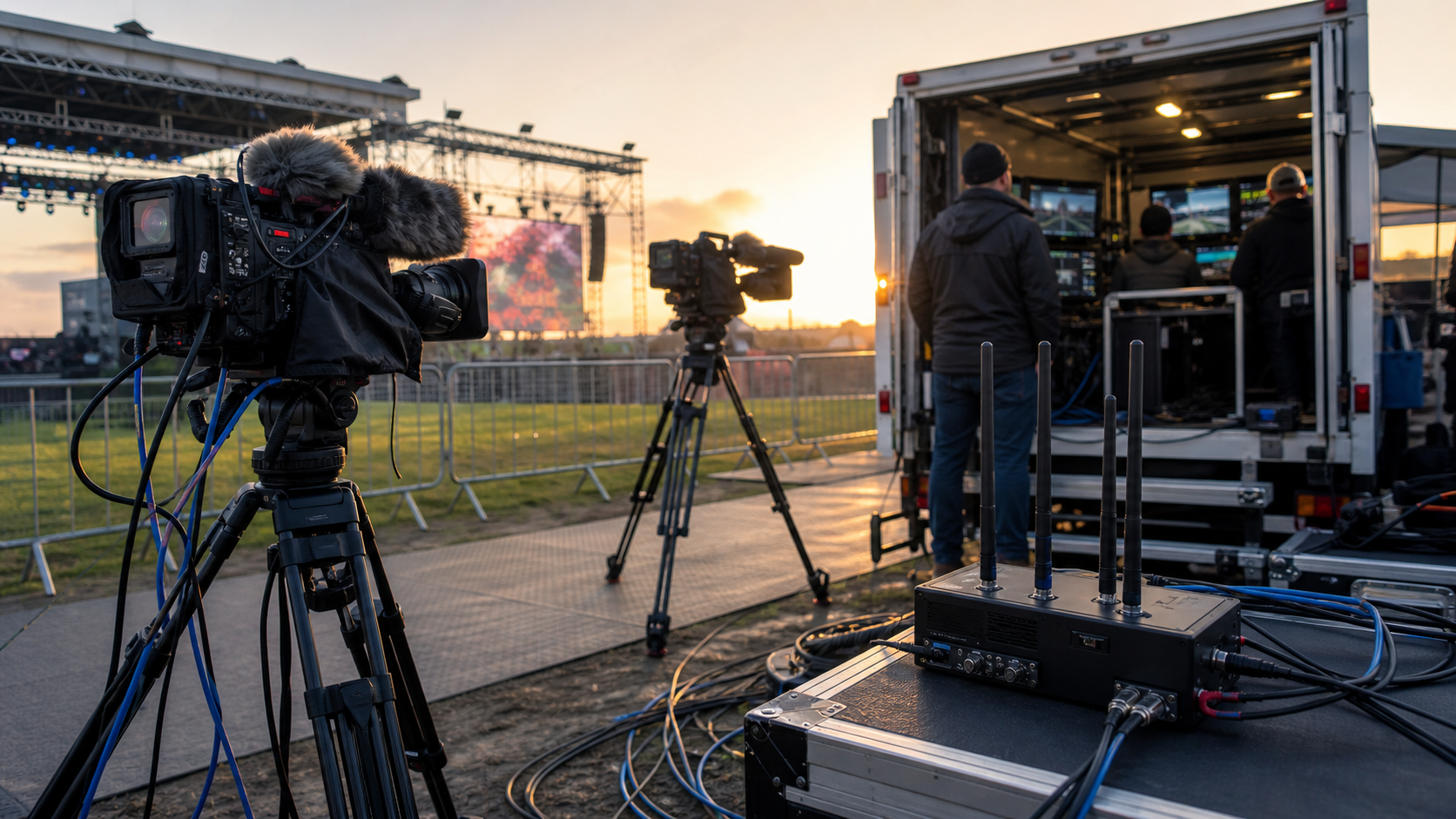
Outdoor Broadcasting: A Reliable Live Stream Setup Guide
A field feed can look perfect during rehearsal and fail as soon as the venue fills, the wind rises, or a congested network starts dropping packets. Reliable outdoor broadcasting therefore depends less on any single camera or encoder than on a tested system with backups at every critical point.
Outdoor broadcasting is the capture, production, and transmission of television, radio, or online video from a location away from a permanent studio. Also called outside broadcasting or OB, it turns a venue into a temporary production environment using cameras, microphones, switching, encoding, connectivity, power, monitoring, and a coordinated crew.
This guide explains how that system works and how to plan one without making an OB truck the default answer to every production.
What outdoor broadcasting means
“Outdoor” can be misleading. An outside broadcast may originate from a stadium, concert hall, conference center, place of worship, street, or temporary indoor venue. The defining factor is that production happens away from the broadcaster’s fixed studio.
The format is also broader than traditional television. A modern OB workflow can send a program feed to a broadcast center, an OTT platform, social channels, an in-venue screen, or several destinations at once. Some productions mix everything on site. Others use remote integration, often called REMI, to send camera and audio feeds back to a central control room.
The Ross Video guide to outside broadcasting describes the conventional model: cameras and microphones feed a mobile production unit, operators switch and mix the program, and the finished output travels by satellite, fiber, or wireless network. That remains useful, but compact flypacks and cloud production now let smaller teams build the same logical signal chain without a full-size truck.
Common use cases
Outdoor broadcasting is used wherever the location is part of the story:
- live sports with multiple cameras, commentary, graphics, and replay;
- concerts and festivals with complex audio and rapidly changing lighting;
- breaking news and public events where deployment speed matters;
- corporate launches, conferences, and shareholder meetings;
- education, worship, and community events reaching remote audiences;
- live pay-per-view programs that need controlled access and monetization.
The scale changes, but the engineering question stays the same: how will every essential signal travel from source to viewer, and what happens when the preferred path fails?
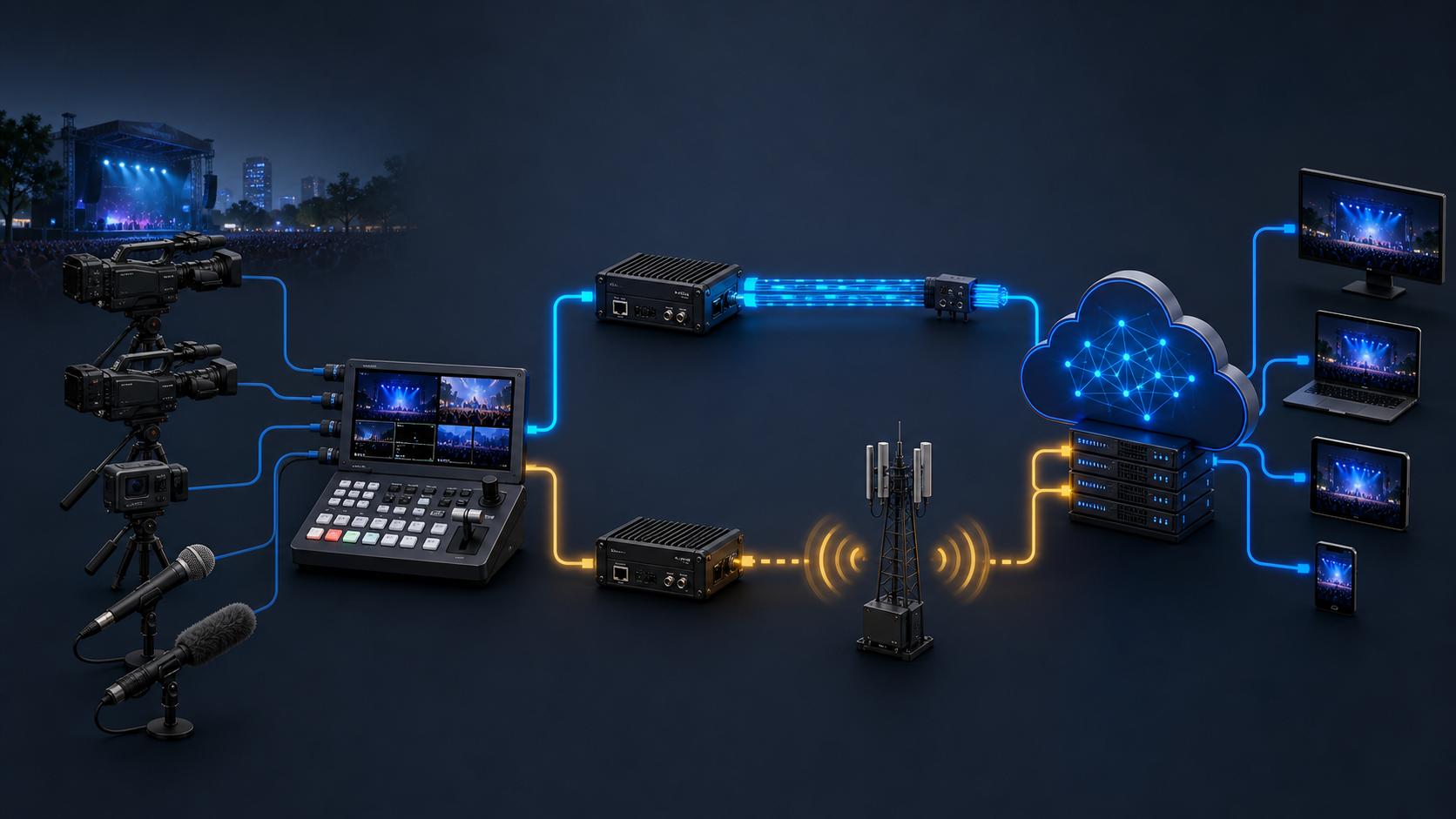
How an outdoor broadcasting workflow works
An OB system is easiest to understand as five connected stages.
1. Capture
Cameras create video feeds; microphones and direct audio inputs capture speech, ambience, music, and commentary. Camera operators, audio technicians, and lighting teams make the raw sources consistent enough to mix.
For multicamera work, match frame rate, resolution, color settings, and synchronization before rehearsals. A camera that looks acceptable alone can become distracting when the director cuts to a differently balanced angle.
2. Transport to production
Video and audio must reach the production area. Short cable runs may use SDI, HDMI, or audio multicore. Larger venues may use fiber, managed IP, wireless links, or a combination.
This contribution layer is separate from viewer delivery. A wireless camera link across a venue, an SRT feed to a remote control room, and an HLS stream to viewers solve different parts of the journey.
3. Produce the program
The production switcher selects camera feeds and adds graphics. The audio mixer balances speech, effects, music, and ambience. Replay, recording, captioning, intercom, tally, and confidence monitoring may join the chain depending on the show.
The result is a program feed, but keeping isolated camera recordings is valuable. Those records support highlights, edits, recovery from an on-air mistake, and a clean version without graphics.
4. Encode and contribute
An encoder compresses the program into a format that the upstream service can accept. RTMP is still common for platform ingest, while SRT is well suited to contribution across unpredictable IP networks. The open-source Secure Reliable Transport project documents packet-loss recovery, configurable latency, encryption, and connection bonding for protected live transport.
Protocol choice does not create bandwidth. Measure the route under realistic load, leave headroom above the encoded bitrate, and tune latency to the network rather than chasing the smallest possible number. The project’s srt-live-transmit documentation recommends setting SRT latency at roughly three to four times the measured round-trip time as a starting point.
5. Package and deliver
The contribution feed reaches a cloud or broadcast facility, where it may be transcoded into an adaptive bitrate ladder, packaged, protected, and distributed through a CDN. The player then chooses a rendition that fits the viewer’s device and current connection.
Our guides to real-time streaming protocols and adaptive bitrate streaming explain the difference between contribution latency and scalable viewer delivery. Treating them as one problem often leads to a fragile setup or an unnecessarily expensive one.
Outdoor broadcasting equipment checklist
There is no universal kit list. Start with the shots, sound, destinations, venue constraints, and acceptable failure modes, then choose equipment.
| System | Typical components | Question to answer before deployment |
|---|---|---|
| Video | Cameras, lenses, tripods, filters, shading controls | Can every key moment be covered if one camera fails? |
| Audio | Shotgun, lavalier, handheld, headset, ambience mics, mixer | Is speech intelligible in wind and crowd noise? |
| Production | Switcher, multiviewer, graphics, replay, recorders | Which functions are essential, and which can be dropped safely? |
| Sync and comms | Genlock or IP timing, intercom, IFB, tally | Can the director reach every operator during an incident? |
| Encoding | Primary and backup encoders, return decoder | Are profiles, keyframes, audio mapping, and destinations validated? |
| Connectivity | Fiber, Ethernet, satellite, Wi-Fi, cellular, bonded links | Are primary and backup paths truly independent? |
| Power | Venue mains, distribution, UPS, batteries, generator | What remains online during a power interruption? |
| Protection | Weather covers, cable ramps, cases, cooling, grounding | Is the system safe for people, equipment, and expected conditions? |
| Monitoring | Waveform, scopes, headphones, network telemetry, return feed | Can the team see source, contribution, and audience-side health? |
Cameras and support
Choose cameras for the production rather than the spec sheet. Long-lens sports coverage needs stable support and precise control. A mobile news or community stream may benefit more from fast setup, integrated audio, and reliable autofocus.
Plan positions before choosing quantities. Check sight lines after seating, staging, LED walls, security barriers, and sponsor structures are installed. Protect cables from public traffic and keep weather covers accessible rather than packed beneath the rest of the kit.
A live streaming microphone plan
Audio problems make a stream feel amateur even when the pictures are sharp. Use microphones for live streaming according to source and environment: a close lavalier or headset for a presenter, handheld dynamics for interviews, shotgun microphones for controlled reach, direct feeds for a console, and separate ambience microphones for the venue.
Wind protection is not optional outdoors. Shure’s audio systems guide for video and film production identifies wind as a frequent problem and recommends suitable wind protection when a microphone’s built-in filter is insufficient. Monitor with closed-back headphones at the mix position; meters cannot reveal clothing rustle, RF hits, or an unnatural noise gate.
Switching, recording, and intercom
A switcher needs enough inputs for cameras, playback, graphics, and at least one contingency source. Record the program and, when the show justifies it, isolated camera feeds. Verify storage duration at the actual codec and frame rate.
Intercom is part of the control system, not a crew convenience. Define who can talk to whom, give presenters a reliable return path where needed, and agree on concise calls for loss of camera, audio, transmission, or power.
Connectivity and encoders
Never accept a venue’s advertised internet speed as a transmission plan. Test the exact handoff, port, VLAN, firewall policy, and route the production will use. Run sustained upstream tests during a comparable busy period and monitor throughput, jitter, packet loss, and round-trip time.
If failure would end the program, create diversity across more than devices. Two encoders on the same power circuit and the same ISP are not independent. A stronger design separates encoder, power, access network, carrier, physical route, and ingest endpoint where practical.
Treat the encoder as a contribution device, not a server for viewers. Our HDMI HLS encoder setup guide covers the settings and the SRT-plus-RTMP backup pattern that keeps a venue feed alive.
How to plan a reliable outdoor broadcasting setup
The most useful deliverable before the kit leaves is a one-page signal-flow diagram. It should show every source, conversion, mixer, encoder, network path, destination, return feed, recording, and power dependency. Mark primary and backup paths clearly.
Step 1: Define the service level
Write down what “successful” means. Include destinations, resolution, frame rate, captions, language feeds, latency, recording, replay, graphics, rights restrictions, and the latest acceptable start time after a fault.
Then rank functions:
- Must remain on air: program video, core audio, primary destination.
- Can degrade: one camera, replay, nonessential graphics, secondary stream.
- Can stop: behind-the-scenes feed, redundant local display, noncritical recording.
This prevents the crew from improvising priorities during an outage.
Step 2: Survey the venue
Walk the site with production, venue operations, network, electrical, safety, and security representatives. Confirm camera positions, cable distances, power circuits, internet demarcation, RF restrictions, loading access, noise sources, weather exposure, crew shelter, and evacuation routes.
For outdoor events, establish a weather decision owner and a stop-work process. The US National Weather Service advises outdoor-event organizers to check forecasts before activity and to have a lightning safety plan; its outdoor sports guidance is a useful baseline for any exposed production crew.
Step 3: Design graceful degradation
Backups should be simple enough to use under pressure. Examples include:
- a locked-off wide camera that remains available if a roaming feed drops;
- a spare wired microphone ready when a wireless channel fails;
- a second encoder already authenticated and receiving the program;
- independent wired and cellular contribution paths;
- local program recording if upstream delivery is interrupted;
- a holding slate with usable audio instead of a dead output.
Cloud ingest must also know what to do with a missing source. AWS MediaLive, for example, supports automatic input failover based on input loss, black video, or audio silence, and documents configurable input-loss behavior. Whatever platform you use, test the actual failover trigger, switching time, slate, recovery, and downstream player behavior.
Step 4: Engineer the bandwidth budget
Add the video bitrate, audio, protocol overhead, return feeds, monitoring, and operational traffic. Keep material headroom for network variation. Do not let crew file transfers, guest Wi-Fi, or office traffic share an unmanaged uplink with the primary contribution feed.
For bonded transmission, determine whether links are aggregated for capacity or duplicated for resilience. Multiple modems from the same carrier may share the same congested cell or upstream failure domain, so carrier and path diversity matter more than modem count alone.
Step 5: Build a power plan
Map each critical device to a circuit and backup source. Put the switcher, audio core, encoders, network equipment, synchronization, and control systems on appropriate UPS coverage. Test how long they run and whether a generator transfer interrupts them.
Label supplies and avoid single power strips that can take down the entire chain. Batteries need a charging and rotation plan, not merely a count.
Step 6: Rehearse faults, not just content
A normal rehearsal proves the planned path. A failure rehearsal proves the production can survive. During the technical run, disconnect the primary network, mute an audio source, remove a camera, stop the primary encoder, and interrupt a noncritical power branch. Confirm who notices, who announces the fault, who switches, and what viewers see.
For media companies turning a recurring field production into a branded streaming service, Apexnova can connect contribution ingest to adaptive encoding, multi-CDN delivery, player apps, analytics, and monetization. That is most useful when the project has outgrown one-off live broadcasting apps and needs an owned, repeatable OTT workflow across web, mobile, and connected TV.
Step 7: Monitor the viewer’s path
Source multiviewers do not prove the public stream is healthy. Monitor at three points:
- the camera and audio sources;
- the contribution feed arriving upstream;
- the packaged stream playing through a normal viewer device and network.
Track encoder load, input loss, dropped frames, bitrate, packet loss, RTT, late packets, buffer health, segment availability, playback errors, and audio levels. The SRT project exposes transport statistics such as send and receive rate, lost packets, late packets, and receiver delay; cloud and player telemetry should complete the picture.
OB truck, flypack, or remote production?
Choose the production model from the event rather than habit.
OB truck
An OB truck provides an integrated control room, established routing, operator positions, cooling, power distribution, and room for a larger crew. It fits complex sports, entertainment, and broadcast events where many sources, replay channels, and specialist roles must work together.
Its drawbacks are cost, access, parking, travel, and a larger on-site footprint.
Flypack
A flypack packages cameras, switching, audio, encoding, and comms into portable cases or racks. It works well for mid-size events, difficult access, and repeatable productions that do not justify a vehicle.
The venue must supply suitable workspace, cooling, security, connectivity, and power. Setup consistency depends on disciplined labeling and documentation.
REMI or cloud production
Remote production keeps more operators and processing at a central facility or in the cloud while a smaller crew captures the event on site. It can reduce travel and make specialist staff available across several events.
It also moves risk into connectivity, timing, return feeds, control security, and coordination. Use it when diverse contribution paths and operational monitoring are strong enough to support the distance.
| Model | Best fit | Main constraint |
|---|---|---|
| OB truck | Large, complex, high-value productions | Cost and on-site footprint |
| Flypack | Portable, repeatable small-to-mid-size shows | Venue workspace and setup discipline |
| REMI/cloud | Distributed teams and centralized operations | Connectivity and end-to-end latency |
Hybrid designs are common: a compact on-site switch for immediate fallback, isolated feeds to a remote control room, and cloud distribution to viewers.
Common outdoor broadcasting failures
One “backup” sharing the same failure domain
A second cable in the same conduit or a second modem on the same carrier may fail with the primary. Document independence instead of assuming it.
Clean pictures with unusable sound
Wind, crowd spill, RF interference, clipping, and poor monitoring can destroy intelligibility. Place microphones close, protect them from weather, scan wireless channels, and record isolated safety tracks where practical.
No return-path monitoring
The crew sees the switcher output but not a stalled CDN rendition or silent player. Maintain an audience-side confidence device with alerts that will be heard in a busy production area.
Untested credentials and platform limits
Expired stream keys, wrong event IDs, firewall rules, account limits, and incompatible profiles often appear only at go-live. Authenticate and stream to the final destination early enough to fix them.
A plan that exists only in one engineer’s head
Signal flow, IP addresses, roles, escalation contacts, show priorities, and fallback actions should be written and shared. A live incident is a poor time to discover that only one person knows how to switch ingest paths.
Frequently asked questions
What does outdoor broadcasting mean?
Outdoor broadcasting means producing television, radio, or online video from a location away from a permanent studio. The location may be outside or inside; the defining feature is the mobile or remote production setup.
What equipment is needed for outdoor broadcasting?
Most setups need cameras, microphones, support, a video switcher, audio mixer, monitoring, recording, an encoder, connectivity, communications, and protected power. The exact equipment depends on the event, number of sources, production model, destinations, and required redundancy.
Do you need an OB van for outside broadcasting?
No. An OB van is useful for large productions, but a portable flypack or REMI workflow can cover smaller events. Choose based on source count, crew, replay and graphics needs, venue access, connectivity, and failure tolerance.
What is the difference between outside broadcasting and live streaming?
Outside broadcasting covers the on-location production process, including capture, mixing, audio, communications, and contribution. Live streaming is the delivery of a live program over IP to viewers; it may originate from an OB site or a fixed studio.
How do you make an outdoor live stream reliable?
Map the signal flow, test the venue under load, separate primary and backup failure domains, protect critical power, rehearse failover, record locally, and monitor the viewer-facing stream. Reliability comes from verified recovery paths, not simply carrying spare equipment.
Build the recovery path before show day
Outdoor broadcasting succeeds when cameras, sound, production, contribution, cloud processing, and playback behave as one observable system. Start with the viewer outcome, choose the simplest production model that meets it, and design a clear response for every failure that could end the program.
Before approving the setup, ask one final question at each stage: if this component disappears now, what does the viewer see next? If the answer is uncertain, the rehearsal is not finished.